
Free Tools for Content Creators: The 2026 Business Toolkit
You can run the business side of a creator career on free tools. Here are the seven that matter - media kit, rates, contracts, deal tracking, analytics, scheduling, and editing - plus a free profile where brands can find you and send paid offers.

Founder & CEO, Superdeal
Updated November 2026.
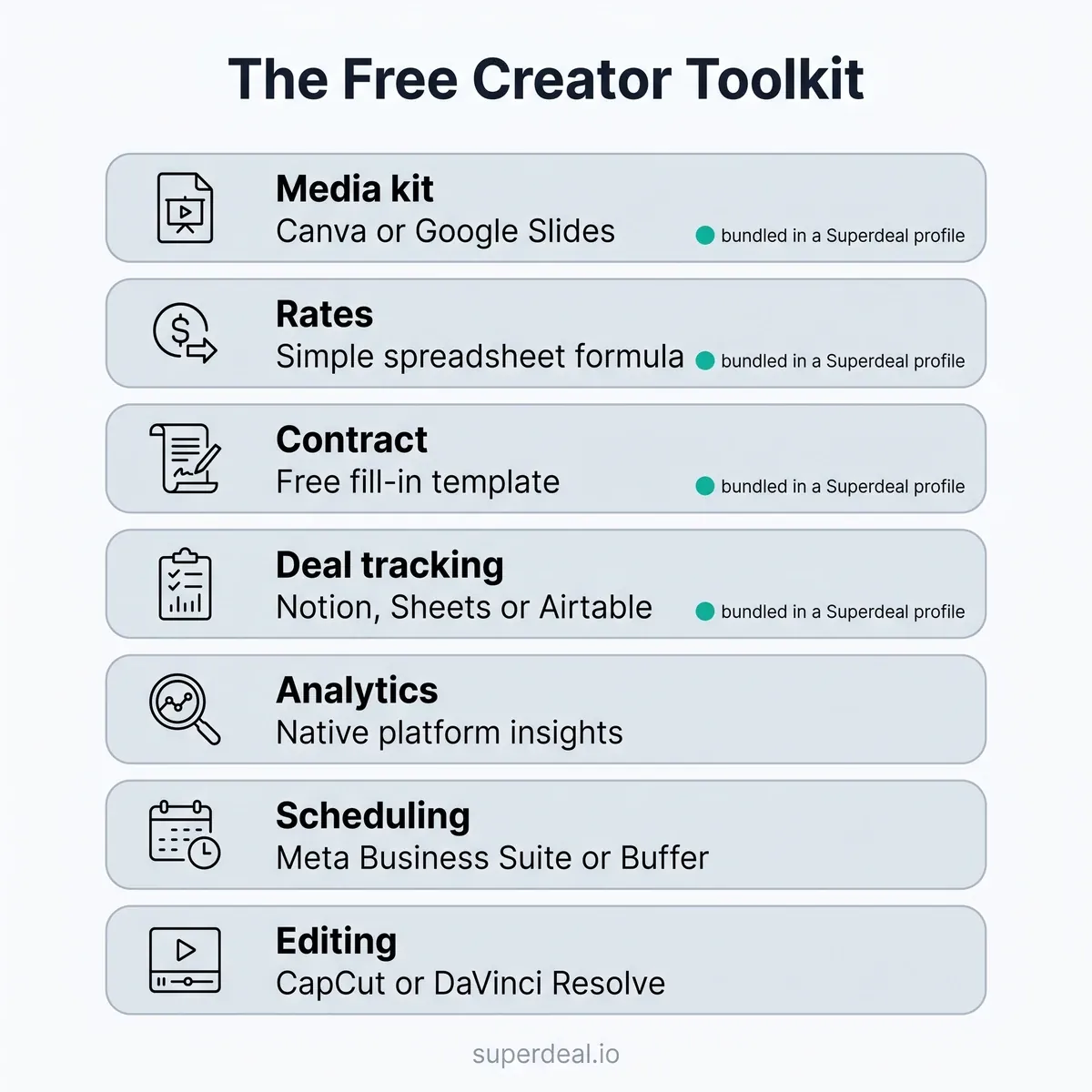
You can run the entire business side of a content creator career without paying for a subscription. The free tools for content creators that matter cover seven jobs, and most of them are unglamorous: building a media kit, setting your rates, sending a contract, tracking brand deals, reading your analytics, scheduling posts, and editing video.
This is a working toolkit, not a list of fifty apps you will never open. For each job you get what the tool does, why you need it, and a free option to start today. At the end, one free profile puts the deal-making pieces in one place: a page brands can find, paid offers, the contract, and getting paid.
The seven jobs behind a creator career
Making content is one job. Getting paid for it is a different one, and it is the part most creators wing. The business side is a short list of repeatable tasks: pitch, price, contract, track, measure, schedule, and edit. Each has a free tool good enough to land and deliver a paid deal. You do not need an agency or a paid stack to look professional to a brand - you need the right seven things set up once.
1. Media kit maker
What it does. A media kit is your one-page pitch: who you are, who your audience is, your best numbers, past collaborations, and your rates. It is the first thing a brand asks for after they reply.
Why you need it. A brand deciding between you and three other creators skims media kits, not DMs. A clear, current kit signals that you treat this like a business and cuts the back-and-forth before an offer lands.
Free option. Canva has free media-kit templates you can fill in an afternoon, and Google Slides works if you want something plainer. Export to PDF and keep two numbers honest and recent: follower count and average engagement rate. The mistake to avoid is a beautiful kit with six-month-old stats. For the full build, see our guide to the influencer media kit. A free Superdeal profile also works as a public creator page that brands find when they search by niche, so your kit is not the only way they see you.
2. Rate and pricing calculator
What it does. A rate calculator turns your reach and engagement into a number you can defend for a post, a video, or a bundle, so you are not guessing when a brand asks what your rates are.
Why you need it. Undercharging is the most common creator mistake, and freezing on the price question is a close second. A number you can explain - base rate plus adjustments for usage rights, exclusivity, and turnaround - beats one you pulled out of the air.
Free option. Start with a simple formula in a spreadsheet: a base rate per platform, then add for extra deliverables, paid-ad usage (whitelisting), exclusivity, and rush timelines. Whatever you land on, write it into your media kit so brands self-select before they message you. On a free Superdeal profile you can show your rates too, and brands can send you a rate request or a deal directly.
3. Contract template
What it does. A contract sets the scope, deliverables, timeline, usage rights, and payment terms in writing before any content is made. It is the difference between a deal and a misunderstanding.
Why you need it. "We agreed in the DMs" is not a payment plan. A short written agreement protects you when a brand changes the brief, delays payment, or wants to run your content as a paid ad for a year without having said so.
Free option. You do not need a lawyer for a standard brand deal. Start from a proven template and a checklist so you do not miss usage rights or exclusivity. Our influencer contract template is a fill-in starting point, and the influencer contract checklist is your pre-send review. One clause creators forget is disclosure: the FTC Endorsement Guides require you to label paid or gifted content clearly, and both you and the brand are on the hook if you do not.
4. Brand-deal tracker (a simple CRM)
What it does. A tracker is a single list of every brand conversation: who reached out, the offer, the deliverables, the due date, whether you invoiced, and whether you got paid. It is a lightweight CRM for your inbox.
Why you need it. Once you have more than three deals in flight, memory fails. Creators lose real money to invoices they forgot to send and deliverables they lost track of. A tracker turns a chaotic inbox into a pipeline you can see.
Free option. A Notion board, a Google Sheet, or an Airtable base all work, and all have free tiers. Use columns for stage (pitched, negotiating, signed, delivered, paid), amount, and due date. If keeping it current by hand is the thing you will never actually do, run your deals somewhere that tracks them for you: on Superdeal, drafts, due dates and live posts are tracked on each deal. Read how creators manage brand deals for more on setting up your system.
5. Analytics
What it does. Analytics tell you what your audience really is - size, location, age, when they are online - and which posts performed. These are the numbers brands buy.
Why you need it. A brand does not just want your follower count; it wants proof of an engaged, relevant audience. Screenshots of your native insights are the evidence that closes deals.
Free option. Every major platform gives creators analytics for free once you switch to a creator or business account. Instagram's professional insights, TikTok's creator analytics, and YouTube Studio all cover reach, audience demographics, and top content. Pull a fresh screenshot before every pitch and paste your headline numbers into your media kit. A healthy engagement rate for most creators sits in the low single digits; treat wild outliers, high or low, as something to double-check.
6. Scheduling
What it does. A scheduler lets you queue posts and reels in advance instead of publishing live every day. You batch a week of content in one sitting and let it go out on time.
Why you need it. Consistency is what grows an audience, and almost nobody stays consistent posting by hand at 9am daily. Scheduling protects your posting cadence from the rest of your life.
Free option. Meta Business Suite schedules Instagram and Facebook posts for free from one dashboard. Buffer's free plan covers a handful of channels, which is plenty when you are starting out. Batch on Sunday, schedule the week, and spend your weekday time on comments and DMs, where the deals actually happen.
7. Editing
What it does. An editor turns raw clips into a finished post: cuts, captions, music, and the fast pacing that short-form rewards. This is the production tool most of your hours go into.
Why you need it. Editing quality is now table stakes. Captions, clean cuts, and a strong first second decide whether a video gets watched, and brands judge your feed before they hire you.
Free option. CapCut is the default free editor for short-form and handles captions, trends, and templates on phone or desktop. DaVinci Resolve is a free, professional-grade editor once you move to longer or higher-end work, and Canva covers quick graphics and simple video. Editing is also where paid deals get produced, especially UGC videos; if that format is new to you, start with what a UGC creator is and the deliverables brands pay for.
One free profile where brands find you and pay you
Seven free tools beat one paid stack you never open. But the deal-making pieces - your media kit, your rates, the contract and getting paid - work best in one place.
That is what a free Superdeal creator profile does. Your profile sits in a public creator database that brands search by niche, and brands such as Cursor, Wispr Flow, Higgsfield, Cymbiotika, OpenAI and Airalo use Superdeal to work with creators. When a brand wants to work with you, the offer spells out the deliverables, dates and price, the contract is built in, and you e-sign right on the offer, no PDFs. Drafts, due dates and live posts are tracked on each deal. You get paid when your delivered work is approved. Creators pay $0 and keep 100% of the agreed rate, minus standard payment processing.
You can browse creator profiles to see how they look, then set up your own. For a wider look at creator software, see our roundup of the best influencer marketing tools. This toolkit is the free starting point.
Frequently Asked Questions
What are the best free tools for content creators?
The essential free tools for content creators cover seven jobs: Canva or Google Slides for a media kit, a spreadsheet formula for rates, a contract template for terms, Notion or Google Sheets to track deals, native platform insights for analytics, Meta Business Suite or Buffer for scheduling, and CapCut or DaVinci Resolve for editing. Together they run the business side of a creator career at no cost.
Can you run a content creator business for free?
Yes. Every core job - pitching, pricing, contracting, tracking, measuring, scheduling, and editing - has a capable free tool. Paid software buys you time and polish once you are earning, but nothing on the essential list requires a subscription to start landing and delivering paid brand deals.
What free tool do I need to pitch brands?
A media kit. It is a one-page summary of your audience, best numbers, past work, and rates, and it is the first thing a brand asks for. Build one free in Canva or Google Slides, and add a free Superdeal profile so brands can also find you when they search by niche.
How do creators keep track of brand deals for free?
Most creators use a free Notion board, Google Sheet, or Airtable base with columns for stage, amount, deliverables, and due date. The catch is keeping it current by hand. On a free Superdeal profile, deals with brands are tracked for you: drafts, due dates and live posts sit on each deal.
What is the best free video editing tool for creators?
CapCut is the most popular free editor for short-form video and handles captions, trends, and templates on phone or desktop. For longer or higher-end work, DaVinci Resolve is a free, professional-grade option, and Canva covers quick graphics and simple edits.
Are free influencer marketing tools enough, or do I need to pay?
For most creators, free influencer marketing tools cover everything needed to look professional and close deals. Start free, then pay only for the specific bottleneck you actually hit. A Superdeal profile is free for creators: you pay $0 and keep 100% of the agreed rate, minus standard payment processing.
About the tools in this guide: free tiers and features change often, and "free" sometimes means a capped plan rather than unlimited use. Confirm current limits on each provider's site before you rely on it. Rate and engagement figures are industry-representative, not fixed thresholds or a Superdeal price list.
Create your free creator profile on Superdeal →
Reading next: What Is a UGC Creator? · Influencer Contract Template · Influencer Contract Checklist